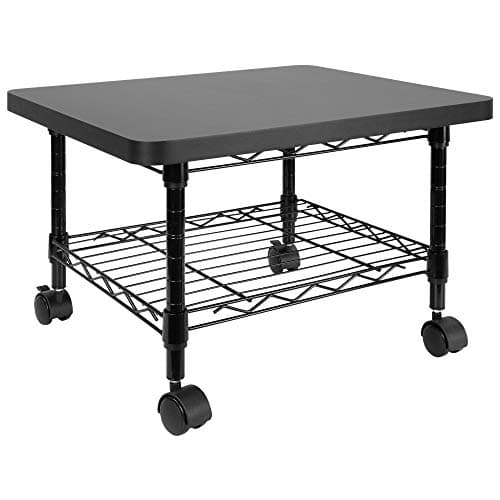
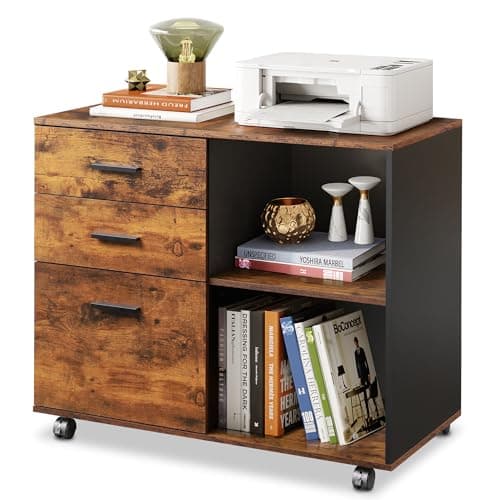
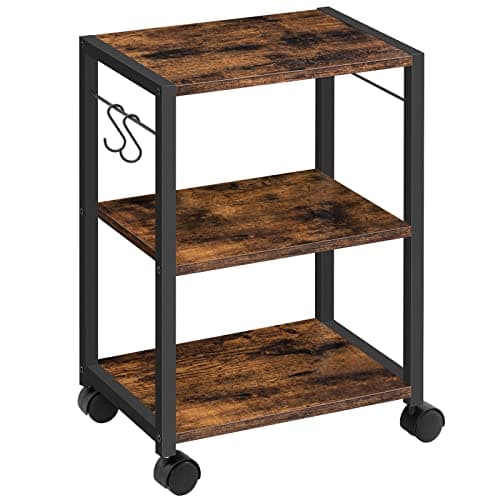
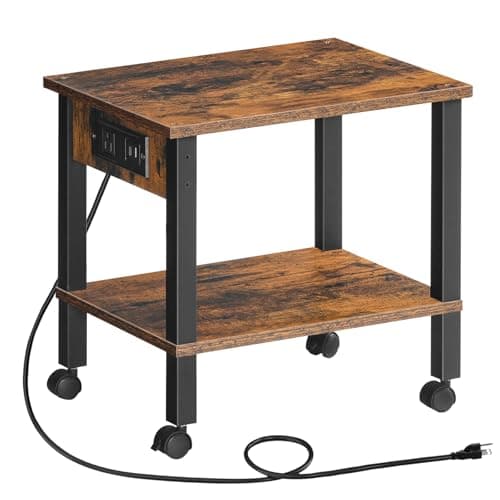
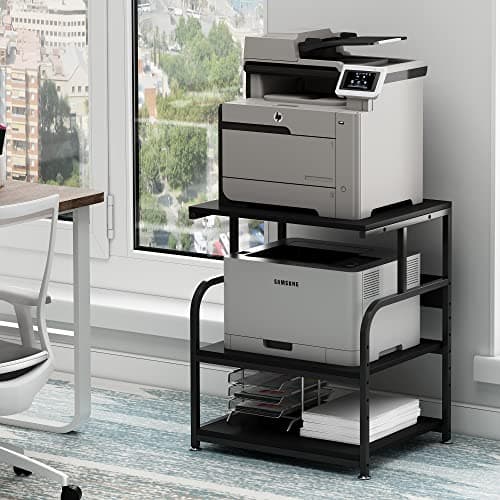
Most of this category is sold on tiers and wheels. The question that decides it is whether the top is bigger than your printer, and for two of the cheapest stands here the answer is no.
SMBy Scooter M.Published October 23, 2026Prices verified November 22, 2026
The short answer
Measure your printer front-to-back before you buy anything. That one number eliminates most of this category: common all-in-one printers are 13.3 to 16.1 in deep, and the two cheapest stands here have tops only 11 in deep. Buy the Fannova if you have a laser or a big all-in-one - 23.6 by 18.9 in of top, 100 lb a tier, and five published clear heights so you know what fits under the top shelf as well as on it. Buy the Mount-It! if the stand has to go under the desk, because at 13 in tall it is the only one here that will. If you need filing in the same purchase, the DEVAISE is a 31.3 in lateral cabinet that happens to be an excellent printer stand.
Measure the printer first. Almost nobody does.
Printer stands are sold on tier count, wheels and the word heavy-duty. None of those is the thing that goes wrong. What goes wrong is that the printer arrives, goes on the stand, and hangs over the front edge by two or three inches - which puts the paper tray out past the support, puts the weight in front of the casters, and makes opening the scanner lid a wobble.
So this page starts from the opposite end: three printers that a home office actually buys, their published footprints, and whether each stand's published top surface clears them.
The three reference printers, from their own published specifications
Printer
Type
Width
Depth
Height
Weight
HP OfficeJet Pro 8125
Inkjet all-in-one
18.11 in
13.29 in
9.17 in
17.6 lb
Brother MFC-L2820DW
Mono laser all-in-one
16.1 in
15.7 in
12.5 in
22.5 lb
Brother MFC-L3720CDW
Color laser all-in-one
17.5 in
16.1 in
15.8 in
44 lb
Each figure is that printer listing's own published specification, read on 2026-10-23. These three are reference points for the arithmetic below, not recommendations - this site does not cover printers.
Note the range. The widest is 18.11 in and the deepest is 16.1 in, and the heaviest is 44 lb. Any stand whose top is under about 18 by 16 in will fail at least one of these machines.
Does the printer fit the top? Published top surface against published footprint
Stand
Top surface
HP 8125
Brother mono laser
Brother color laser
Fannova
23.6 x 18.9 in
Fits, 5.5 in spare
Fits, 3.2 in spare
Fits, 2.8 in spare
Mount-It! MI-7857
19 x 16 in
Fits, 2.7 in spare
Fits, 0.3 in spare
Overhangs 0.1 in deep
DEVAISE 057
31.3 x 15.7 in
Fits, 2.4 in spare
Exactly level on depth
Overhangs 0.4 in deep
MAHANCRIS
16.5 x 11 in
Overhangs 2.3 in deep
Overhangs 4.7 in deep
Overhangs 5.1 in deep
HOOBRO
15 x 11 in
Overhangs 2.3 in deep
Overhangs 4.7 in deep
Overhangs 5.1 in deep
Our arithmetic from both sets of published figures. Spare is the smaller of the two margins; overhang is the depth shortfall, which is the axis that matters because it is where the paper tray and the weight go. The HP and the color laser also overhang the two narrow carts on width, by 1.6 to 3.1 in.
This is the one category that publishes load ratings
Across this site the running complaint is that nobody publishes a weight capacity: not the file cabinets, not the shelving, not the desk organizers. Printer stands are the exception. Every one of the five here states a rating, four of them per shelf rather than just as a total.
Published load ratings
Stand
Rating
Tiers
Margin over a 44 lb color laser
Fannova
100 lb per tier
3
56 lb
DEVAISE 057
150 lb total
Top + 3 drawers
Stated as a total only
Mount-It! MI-7857
50 lb per shelf, 100 lb total
2
6 lb
MAHANCRIS
44 lb per shelf
3
Zero
HOOBRO
44 lb per tier
2
Zero
Each rating is that listing's own published figure. The margin column is our arithmetic against the heaviest reference printer above.
The two 44 lb ratings are worth sitting with. A mid-range color laser weighs exactly 44 lb, so those shelves are rated to precisely their load and nothing more - and that is before the stack of paper you were going to keep underneath it.
What the paper on the lower shelf adds
A letter-size banker's box holds about 2,500 sheets and weighs about 25 lb with the box
So a 500-sheet ream is about 5 lb
Five spare reams on the lower shelf = about 25 lb
Add a spare toner cartridge, roughly 2 to 4 lb for a mono unit
A lower shelf doing its job is carrying about 30 lb before anything else goes on it
Our arithmetic, using the paper-weight figure documented across this site's storage hub. Ream weight varies with paper stock; this is ordinary 20 lb bond.
Clear height is the spec nobody lists
The second fit question, and the one that catches people after the first: a printer does not only need a surface, it needs headroom. If the printer sits on the middle shelf of a three-tier cart, the gap between that shelf and the one above has to clear the machine - and clear the scanner lid as it opens.
Only the Fannova publishes its clear heights, and it publishes five of them, because its middle shelf moves: 11, 12.9, 14.9, 16.9 or 18.9 in. Set against the reference printers that becomes an actual instruction rather than a feature bullet.
Which Fannova shelf setting each printer needs
HP OfficeJet Pro 8125, 9.17 in high -> the 11 in setting clears it
Brother MFC-L2820DW, 12.5 in high -> needs the 12.9 in setting at minimum
Brother MFC-L3720CDW, 15.8 in high -> needs 16.9 in, leaving about 1.1 in
None of the three fits the 11 in setting except the inkjet
Our arithmetic from both sets of published figures. These are bare clearances: a scanner lid that hinges upward needs more, and no printer listing we read publishes its lid-open height.
Under the desk, or beside it
Most of this category says under desk in the title. Only one of these is short enough to mean it. The Mount-It! is 13 in tall overall; the others are 15, 23.6, 24.7 and 30 in.
The number that decides it is the stack, not the stand: stand height plus printer height. On the Mount-It! that is about 22 in with the inkjet, 25.5 in with the mono laser and 28.8 in with the color laser. Measure from your floor to the underside of your desk before assuming any of those clears - desk aprons vary enough that there is no safe general answer, and we are not going to invent one.
If the stand is going beside the desk instead, height stops being a constraint and footprint becomes one. That is the real argument for the two narrow carts, and it is why they stay on this page despite failing the fit test: 11 in of depth goes in gaps that an 18.9 in stand cannot.
How we ranked these
The same five metrics as the rest of this hub - capacity, load rating, footprint, build and documentation - but capacity here is scored on whether a real printer fits the published top surface, because a stand that cannot hold the machine has no other virtues worth weighing. Documentation scores well across the board in this category, which is unusual and worth saying. Full rubric on how we pick.
#
Product
Best for
Score
Price
01
Fannova Large Printer Stand with Adjustable Shelf, 23.6 x 18.9 inThe only stand here with a top big enough for every common all-in-one, a 100 lb per-tier rating, and a middle shelf that moves through five published clear heights.
Mount-It! Under-Desk Printer Cart, 2-Tier (MI-7857)Thirteen inches tall overall, so it actually goes where the listings all claim to: under the desk. A 19 x 16 in top and 50 lb a shelf.
DEVAISE 3-Drawer Mobile File Cabinet / Printer Stand, 31.3 in (057)A 31.3 in lateral filing cabinet that is sold as a printer stand and is genuinely good at both: 150 lb rated, five casters, and a bottom drawer on file rails.
MAHANCRIS 3-Tier Under-Desk Rolling Printer Cart (PTHR4001Z)Three tiers at 44 lb each in an 11 in deep footprint. A good narrow storage cart that is not big enough on top for a normal all-in-one printer.
HOOBRO 2-Tier Printer Stand with Charging Station (BF38UPS01)Under thirty dollars with a built-in outlet and USB port, which nothing else here has. The top is 15 x 11 in, which is smaller than any common printer.
Ranked on whether a real printer fits first, then on load rating and footprint. Prices are live.
01/Fannova
Large Printer Stand with Adjustable Shelf, 23.6 x 18.9 in
Best for a heavy all-in-one
8.4/ 10
The only stand here with a top big enough for every common all-in-one, a 100 lb per-tier rating, and a middle shelf that moves through five published clear heights.
The only stand here with a top big enough for every common all-in-one, a 100 lb per-tier rating, and a middle shelf that moves through five published clear heights.
Published specification
Dimensions
23.6 in wide x 18.9 in deep x 28.2 or 30 in high
Fannova published specification
Top surface
23.6 x 18.9 in
Fannova published specification
Load rating
100 lb per tier, 3 tiers
Fannova published specification
Adjustable clear height
5 levels: 11, 12.9, 14.9, 16.9 or 18.9 in between top and middle shelf
Fannova published specification
Casters
Industrial-grade, all four lockable; foot pads included as an alternative
Fannova published specification
Material
Particle board with water- and wear-resistant surface, powder-coated metal frame
Fannova published specification
Shelf support
Steel tube beneath each shelf rather than screwed into the side frame
Fannova published specification
Weight
Not published
Absence confirmed against the published specification
What the specs are good for
23.6 x 18.9 in of top surface clears every printer we measured against it, including a 17.5 x 16.1 in color laser, with room for the paper tray to pull out
100 lb per tier is more than double the heaviest common all-in-one, so the rating is not the constraint
Five published clear heights between 11 and 18.9 in: the only stand here that tells you whether your printer fits UNDER the top shelf as well as on it
Lockable casters and foot pads in the same box, so it can roll or it can stay put
What they are not
The biggest footprint here by a wide margin - 23.6 in of floor width, against 11 in for the two cheap carts
At 28.2 or 30 in high it stands beside a desk, not under one
Does not publish its own weight, which is the one number missing from an otherwise unusually complete listing
Particle board, not solid or ply, at the highest price on this page
Skip this if
Skip this if the printer is a small inkjet. You are paying for 100 lb tiers and 18.9 in of depth that a 13 in deep machine will never use, and the Mount-It! does that job for a third of the money.
Who it is for. A color laser or a big all-in-one, where the printer is heavy, deep, and needs the spare reams and toner within reach.
Thirteen inches tall overall, so it actually goes where the listings all claim to: under the desk. A 19 x 16 in top and 50 lb a shelf.
Thirteen inches tall overall, so it actually goes where the listings all claim to: under the desk. A 19 x 16 in top and 50 lb a shelf.
Published specification
Dimensions
19 in wide x 16 in deep x 13 in high
Listing published specification
Top surface
19 x 16 in
Listing published specification
Weight
13 lb
Listing published specification
Model
MI-7857
Mount-It! published specification
Load rating
100 lb total, 50 lb per shelf, 2 tiers
Mount-It! published specification
Casters
4 omnidirectional swivel wheels, lockable
Mount-It! published specification
Material
Steel wire frame, solid metal poles, laminate top, powder-coat finish
Mount-It! published specification
Assembly
Two-part plastic clips; no tools described
Mount-It! published specification
What the specs are good for
13 in of total height is the whole point: this is the only stand here that fits under a standard desk with a printer on it
A 19 x 16 in top takes a mono laser or a large inkjet without overhang
Publishes a model number and a per-shelf rating as well as a total, which most of this category does not
13 lb empty, so repositioning it loaded is a one-hand job
What they are not
A 16 in depth is 0.1 in short of the deepest common color laser we measured, so the biggest machines will overhang slightly at the back
Two tiers, not three: paper and toner share one shelf
50 lb per shelf is the second-lowest rating here, and a 44 lb color laser leaves only 6 lb of margin
Wire-frame shelving means small items need a tray or they tip through
Skip this if
Skip this if your printer is a 15.8 in tall color laser. Putting it on a 13 in cart under a desk gives you a stack about 29 in high that will not clear most desk aprons, and the whole reason to buy this one is that it goes underneath.
Who it is for. A small room where the floor beside the desk is already spoken for and the printer has to live in the knee well's neighbor.
3-Drawer Mobile File Cabinet / Printer Stand, 31.3 in (057)
Best printer stand with filing
7.8/ 10
A 31.3 in lateral filing cabinet that is sold as a printer stand and is genuinely good at both: 150 lb rated, five casters, and a bottom drawer on file rails.
A 31.3 in lateral filing cabinet that is sold as a printer stand and is genuinely good at both: 150 lb rated, five casters, and a bottom drawer on file rails.
Published specification
Dimensions
31.3 in wide x 15.7 in deep x 24.7 in high, including wheels
DEVAISE published specification
Top surface
31.3 x 15.7 in
DEVAISE published specification
Weight
47 lb
Listing published specification
Model
057
DEVAISE published specification
Load rating
Supports up to 150 lb
DEVAISE published specification
Drawers
3: two upper supply drawers, one bottom drawer with adjustable rails for A4 and letter files
DEVAISE published specification
Slides
Full extension
DEVAISE published specification
Casters
5 casters; front 2 lockable, central caster to prevent tipping with drawers open
DEVAISE published specification
Material
Wood board, scratch and stain resistant
DEVAISE published specification
What the specs are good for
The only pick here that stores files as well as holding the printer, with a bottom drawer on adjustable rails for letter or A4
150 lb rated, the highest on this page, and a central fifth caster specifically to stop it tipping when the drawers are out
31.3 in of top surface: enough for the printer AND the thing you were going to put next to the printer
Full-extension slides on a 96-dollar cabinet, which is better hardware than several dedicated file cabinets manage
What they are not
15.7 in deep is the shallowest top of the three stands that fit anything, and it is 0.4 in short of the deepest color laser we measured
31.3 in of wall or floor, which is more than most people picture when they search for a printer stand
47 lb and flat-packed: this is a two-person assembly and a one-time placement
Publishes a total load rating but not a per-drawer one, so what the file drawer takes is unstated
Skip this if
Skip this if you already own a file cabinet. You are paying for filing twice, and the Fannova gives you more top surface, a deeper top and a higher tier rating for about 44 dollars more.
Who it is for. A home office setting up from nothing, where one purchase has to be the printer stand and the filing at the same time.
3-Tier Under-Desk Rolling Printer Cart (PTHR4001Z)
Best three-tier for a corner
6.8/ 10
Three tiers at 44 lb each in an 11 in deep footprint. A good narrow storage cart that is not big enough on top for a normal all-in-one printer.
Three tiers at 44 lb each in an 11 in deep footprint. A good narrow storage cart that is not big enough on top for a normal all-in-one printer.
Published specification
Dimensions
16.5 in long x 11 in wide x 23.6 in high
MAHANCRIS published specification
Top surface
16.5 x 11 in
MAHANCRIS published specification
Weight
9.5 lb
Listing published specification
Model
PTHR4001Z
MAHANCRIS published specification
Load rating
44 lb per shelf, 3 tiers
MAHANCRIS published specification
Casters
4 universal casters, 2 lockable, plus 4 foot pads as an alternative
MAHANCRIS published specification
Extra
Side rails to stop items sliding off, and 2 hooks for folders
MAHANCRIS published specification
What the specs are good for
Three usable tiers in 11 in of depth, which is the best shelf-count-per-floor-inch on this page
Publishes a per-shelf rating and a model number at under 30 dollars
Casters or foot pads in the same box, and side rails so the contents stay put when it rolls
9.5 lb, so it moves with one hand even loaded
What they are not
An 11 in deep top. Every common all-in-one printer we measured is 13.3 to 16.1 in deep, so all of them overhang the front or back edge
44 lb a shelf is exactly the published weight of a mid-range color laser, leaving no margin at all
23.6 in tall puts the top surface above most desk aprons, so it does not slide under a desk either
Open tiers with no closed storage
Skip this if
Skip this if you actually have a printer to put on it. Measure yours: if it is more than 11 in front-to-back, and nearly all all-in-ones are, it will hang over the edge of this cart. It is a good narrow supplies trolley and a poor printer stand.
Who it is for. A narrow gap beside a desk holding paper, toner and supplies, with a small single-function printer at most.
2-Tier Printer Stand with Charging Station (BF38UPS01)
Cheapest, with a power socket
6.4/ 10
Under thirty dollars with a built-in outlet and USB port, which nothing else here has. The top is 15 x 11 in, which is smaller than any common printer.
Under thirty dollars with a built-in outlet and USB port, which nothing else here has. The top is 15 x 11 in, which is smaller than any common printer.
Published specification
Dimensions
15 in long x 11 in wide x 15 in high
HOOBRO published specification
Top surface
15 x 11 in
HOOBRO published specification
Weight
7 lb
Listing published specification
Model
BF38UPS01
HOOBRO published specification
Load rating
44 lb per tier, 2 tiers
HOOBRO published specification
Power
Built-in socket with 1 outlet and 1 USB port
HOOBRO published specification
Material
12 mm particleboard
HOOBRO published specification
Casters
4 wheels; locking not stated
Absence confirmed against the published specification
What the specs are good for
A real outlet and USB port built into a 29-dollar cart, which solves the extension-lead problem that every printer in a corner creates
Publishes a per-tier load rating, a model number and the board thickness in millimeters
7 lb and 11 in deep: it fits in gaps nothing else here will
Two open tiers at a price where most products publish nothing at all
What they are not
A 15 x 11 in top is smaller than every common all-in-one printer, all of which are at least 16.1 in wide
44 lb per tier with no margin over a heavy color laser, and the laser would not fit anyway
Does not state that the wheels lock, which on a cart carrying a live electrical socket is a real omission
12 mm particleboard is the thinnest construction on this page
Skip this if
Skip this if it has to hold the printer. On published dimensions no common all-in-one fits its top. Buy it as a powered side cart for a small single-function printer, a scanner or supplies, and put the all-in-one on something 19 in wide or more.
Who it is for. A tight corner that needs power more than it needs surface: a small printer or scanner, the router, and the things that have to stay plugged in.
The DEVAISE above is a lateral filing cabinet sold as a printer stand, and it is not the only one that works that way. A three-drawer lateral cabinet is typically 28 to 31 in wide, 15 to 18 in deep and around 24 to 28 in high, which is a better top surface than most dedicated printer stands and a better use of the same floor.
The trade is honest both ways. A cabinet gives you filing under the printer and a heavier, more stable base; a dedicated stand gives you open tiers you can see into, lower height if it needs to go under a desk, and costs less. Best 3-drawer file cabinets ranks the cabinets, including one picked specifically for this job, and lateral vs vertical file cabinets has the footprint arithmetic if you are weighing the formats.
If a stand is not what you need
Put it on a shelf. If the printer is light and used rarely, a shelf bay costs a fraction of a stand and takes no floor at all. The load arithmetic is on best office shelving, and office storage cabinet vs shelving is the decision between the two.
Put it on a storage cart you already wanted. A rolling cart with a flat top does this job, and the picks are ranked for storage rather than for printers: best office storage carts.
Use the space under the desk properly first. Before buying furniture to hold a printer, it is worth knowing what the dead space under a desk can take - best under-desk storage and under-desk storage ideas.
FAQ
Questions people ask about this
How big should a printer stand be?+
At least as big as the printer's published footprint, which for common all-in-ones means about 18 in wide by 16 in deep. Depth is the number that matters most, because that is the axis the paper tray pulls out along and where the weight sits relative to the casters. Measure your own printer front-to-back and treat that as the minimum top depth - two of the five stands on this page have 11 in tops and clear none of our three reference machines.
How much weight can a printer stand hold?+
This is one of the few categories where sellers publish it. The five here state 44 lb, 44 lb, 50 lb per shelf, 100 lb per tier and 150 lb in total. A mid-range color laser weighs about 44 lb on its own, so the two 44 lb ratings have no margin left for the printer plus anything. Spare paper adds up fast: a 500-sheet ream is about 5 lb, so five reams on the lower shelf is roughly 25 lb.
Will a printer stand fit under my desk?+
Only if the stand plus the printer is shorter than your desk's underside. Of the stands here only one, at 13 in tall, is designed for it; the rest are 15 to 30 in. Add your printer's published height to the stand height and measure from your floor to the desk apron. With a 13 in stand that stack is about 22 in for a slim inkjet and nearly 29 in for a tall color laser, which is the difference between fitting and not.
Is a file cabinet a good printer stand?+
Often better than a dedicated stand. A three-drawer lateral cabinet gives a wider, deeper top than most printer stands, a much heavier base, and filing underneath instead of open shelves. One of the picks on this page is exactly that product. The cases against it are height, if the stand has to go under a desk, and price.
Do printer stands need locking wheels?+
If the printer overhangs or the stand is light, yes. A loaded all-in-one with a pull-out tray applies real force toward the front edge, and a cart that rolls when you tug paper out is both annoying and a tipping risk. Four of the five here state that at least two wheels lock; one states four wheels but does not say whether they lock, which on a cart carrying a powered socket is a gap worth knowing about.
Sources
Where these numbers came from
We have not handled any of these products. Every figure on this page is either the manufacturer's own published specification, named as such, or our arithmetic from those figures, shown so you can check it. Prices come from Amazon through our price layer and carry the date they were verified.
Amazon product listings, retrieved 2026-10-03
Published specifications, dimensions, materials and manufacturer claims were read from each product's own listing data. Prices and availability refresh daily and carry their verification date on the page.
The full published method, and an explicit statement of what a specs-only approach cannot tell you.
Our arithmetic: the weight of office paper
A standard letter-size banker's box holds about 2,500 sheets; 2,500 sheets of 20 lb bond weighs about 25 lb, so a full box is roughly 30 lb including the box. That works out at about 1.5 lb per linear inch of upright files. Every shelf-load and cabinet-load comparison on this site uses those figures and shows the sum.